Guide: Download Facebook Videos HD Online Fast
Looking to save Facebook videos in stunning 1080p, Full HD, or 4K quality? While many tools fail to capture full audio, FBSave.to ensures a perfect download every time. No software installation needed—everything works seamlessly right in your web browser.
What makes FBSave.to the best choice?
- Lightning-fast downloads for Facebook Reels and public clips.
- Exclusive support for private videos and closed group content.
- One-click conversion of Facebook clips to high-fidelity MP3.
- Unlimited, free MP3 music extraction from any Facebook video.
- 100% free forever—no accounts, no logins, no hidden fees.
Simple Steps to Download Facebook Videos with FBSave
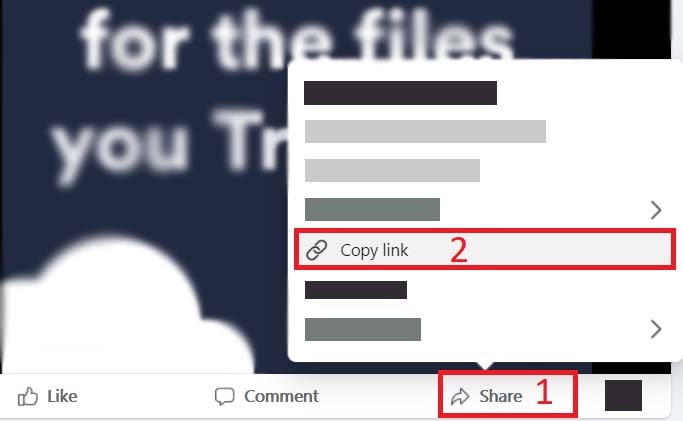
Step 1: Step 1: Copy the Video URL
Open Facebook (app or web), locate your favorite video or Reel. Tap Share and select Copy Link to save the address to your clipboard.
Step 2: Step 2: Paste URL into FBSave.to
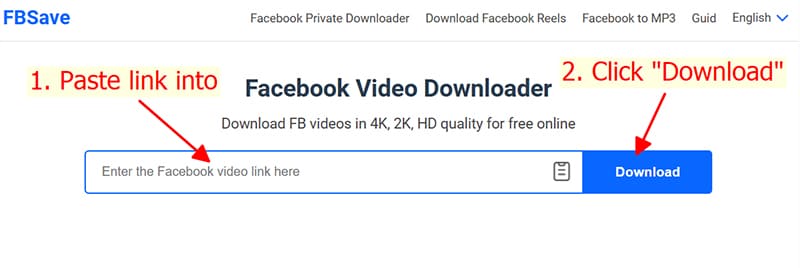
Go to FBSave.to, paste the copied link into the search box, and hit the Download button to analyze the video.
Step 3: Step 3: Choose Quality and Download
- Pick your preferred format: MP4 for high-quality video or MP3 for pure audio extraction.
- Resolution options: SD, 720p, 1080p, Full HD, or 4K ultra-clarity.
- For high-end quality (HD+), click Render. Our cloud system will merge video and audio in seconds.
- Finally, click the Download button to save the file permanently to your device. Enjoy your video offline!
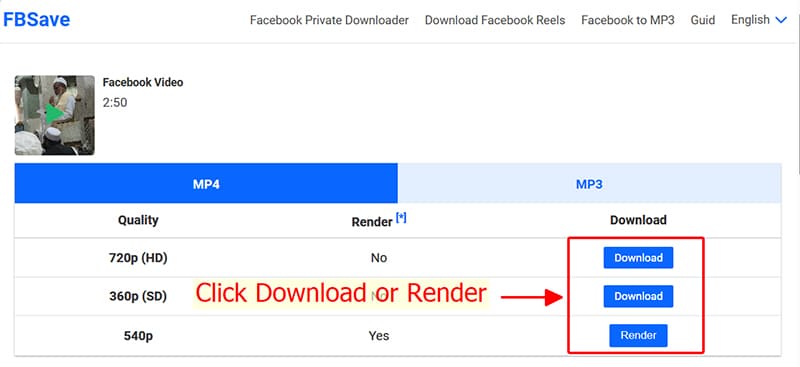
Note: For 4K and HD+ resolutions, Facebook stores video and audio separately. FBSave will automatically process and merge them into a high-quality integrated file for you.
Want to save content from private groups? Use our Private Facebook Downloader for step-by-step guidance on restricted videos.